
Learn how to create slanted roof, roof corners and more complex rooms in ViSoft Premium.
Slanted/ sloped roofs #
Open the menu Room | Roof. Note that you can only place a roof in floor view, the function is not available in the other views. Click on Roof and place it on the wall.
Placed roof is always the same length as the related wall. You can create a shorter roof using the Roof Delimeter option.
The roof is highlighted: set the right parameters under Roof Properties. This you can do in 3D-view if you wish.

- Mounting height: set the start point of the roof.
- Angle determines the angle of the slope.
- Depth set depth of the selected roof.
It is possible to place roofs on the walls that are next to each other. In that case the angle will be created between two roofs.
You can place windows into the roof.
Roof Corner #
To place a roof corner, use the function Roof Corner in menu Room | Roof and work from floor view. Select the corner where you want to place the roof. Fill in the right properties under Roof Properties menu in 3D to see the changes you make.
Complex roofs #
To create a complex roof, with 2 corners or roof rafters, use extra block- or free murals. The following example uses the roof function, 2 blocks, 3 free murals and 1 divider.

Step 1
Start with placing the roof. Set the mounting height to 0 and angle to 70 under the properties.
Step 2
Place a block (tab mural in menu Roof) up against the roof. Open the properties, and set the bottom bevel angle (b) to – 40.
Step 3
Place the divider and block on the ground against the sloped roof. Set the right properties. Don’t worry about the back: it automatically shapes in the right form against the wall.
Step 4
The rafters you can create with a free mural. Go to wall view. Use the navigation panel to select the wall where you have a side view of the roof.
Draw the free mural against the block in the right shape. Connect the start with the endpoint and edit the properties if needed. For multiplying the rafters, simply use copy and paste.
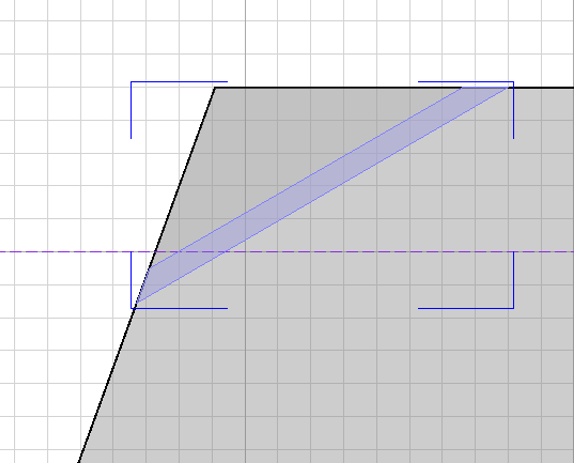
Free mural in wall-view.

